Everything it does
House Brownie is designed to be entirely voice controlled. Hold the mic, say what changed in the house, review the draft it writes, tap Apply. Every screen has buttons too, but the app is built so you never have to hunt for them.
The front page has the short pitch. This one goes feature by feature, in plain words, including what the app deliberately doesn't do. I wrote it myself, and I use the app daily.
Say it however it comes out
Talk like a person: "we're out of milk, low on toilet paper, add batteries to the list, and remind me to water the plants tomorrow." One note, mixed languages mid-sentence if that's how your house talks.
Nothing saves while you speak. One model turns the note into a draft of reviewable changes; a second checks the draft against what you actually said, quoting your own words back when it fixes a row. You stay the editor: say "no, get the milk at Continente" and only that row changes. Dates land right across languages ("tomorrow", "próxima terça", "明天" all become due dates in your timezone), and a date it can't read says so instead of saving blank.
Questions ride along ("do we have eggs?") and can never change data. Applying lands the whole note as one all-or-nothing batch with one-tap Undo; the only thing Undo leaves standing is a new room or store the note had to create. Audio is discarded after transcription, transcripts delete after 90 days. Voice is the one paid add-on, because it costs real money to run: bring your own OpenAI key (nothing from us) or prepaid credits at cost plus 15%. No monthly free allowance — the plan includes a one-off $0.50 of voice credit to try it; after that it's your key or your credits.
Two kinds of things
Every item is one of two kinds, and one toggle, Keep stocked, decides which.
Supplies are what you restock: olive oil, toilet paper, coffee. They carry a stock status and put themselves on the shopping list when they run low. Belongings are what you just need to find again: the passports, the hex keys, the raclette machine. A belonging lives in a room and that's its whole job; it can never wander onto a shopping list.
Adding an item takes one field. The name is the only required bit; room, store and category can come later, or never.
Four words for how much is left
A supply is Full, Medium, Low or Out: one tap on a four-segment control that shows a color and the word, so it works if you're color-blind. No expiry spreadsheets, no counting unless you want to.
Counting is optional per item: a count, liters, kilos or a percentage, plus what "full" means. A counted item derives its status from the amount: type 2 of 6 and it reads Low, tap Out and the count drops to zero, buy it and the count refills.
The same thing in two places
One supply can live in several rooms, each with its own status. Casey's bathroom has toilet paper, yours doesn't; most apps can only record "toilet paper: yes". House Brownie shows the split, and the house-wide answer is the best of all rooms.
It's opinionated about money, too. Something Out in one room but stocked in another skips the shopping list and lands under Already in the house with a Move button. To update one room, scan its label or name it in a voice note; the main control sets the whole house.
Finding things again
Search is one bar over items, rooms and stores, and it matches every name an item carries, so "milk" and "leite" find the same carton. Results are live: you can mark the milk Low right in the result row.
Or just ask: "where's the pump?" into the voice sheet gets an answer card with rooms and current status. Questions are read-only by construction, and if two things match you get both as tappable choices instead of a confident wrong answer.
A list that writes itself
Nobody in your house "makes" the shopping list. Anything Out or Low is on it automatically, each line tagged with why; when the house is stocked, the list is empty and says so nicely.
The list groups itself by shop, which is a whole thing of its own — it's the next section. Checking off is the purchase: status back to Full, counted items refilled, a small receipt with Undo.
Lines snooze a week or skip a trip; skips expire after 12 hours, so "this trip" means this trip. Free-text one-offs ("birthday candles") drop straight in, and one tap promotes a regular into a tracked item. Packing lists handle trips (to-buy, to-pack, packed) and save as templates for next summer.
Everything from the pharmacy, in one place
Nobody buys everything in one shop. Milk and rice come from the supermarket, toothpaste from the pharmacy, the good tomatoes from the frutaria down the road. One flat list makes you read all of it in every shop, which is how you end up home without the toothpaste.
So a thing carries the shops you actually buy it at — one, or several. Tag them from the item's own sheet, or just say it: "get the milk at Continente". When something could come from more than one place, mark the usual one and the list uses it. None of this is required: leave a thing untagged and it waits under Anywhere at the bottom, which is where a new household starts and a perfectly reasonable place to stay.
A shop is a name, not an address. Pingo Doce is one entry however many of them you use, and the actual branches hang underneath with whatever you call them — "the one by the school", "big Continente". Save a branch from an address search, or by standing in it and tapping use my current location, or save it with no coordinates at all: that last one is why a roadside frutaria with no map listing still works here.
Tell the app you're at the shop and that group floats to the top with a badge, showing only what to grab here. If your phone will say where it is, the branches sort nearest-first — but proximity only ever reorders the list, it never decides for you. Every shop stays pickable whether or not you're standing near one, and whether or not you ever gave it coordinates.
Your location is read once, on that tap, compared against your own saved spots on your own phone, and never stored or sent to us. There's no location history in House Brownie because there's nowhere for one to live.
Chores, one-offs, and whose turn it is
Tasks and routines are one system: any task can repeat, or not. A one-off takes a quick due date or none at all, and can be tied to a store, so "drop off the parcel" surfaces while you're standing in the shop.
Any task can be assigned. Assignment is a chip, not a ceremony: Anyone, or a household member's name, and the task wears that name on the list. A voice note can hand chores over too: "have Casey fix the squeaky door" lands assigned to Casey. The Done recently feed shows who actually did what, which settles a certain kind of household argument.
A routine picks one of three shapes. After I do it: "water the plants every 3 days," counted from when you actually did it, so being late slides the schedule instead of nagging. On set days: "recycling on Tuesdays," calendar-anchored. Monthly: "rent on the 1st"; a routine set for the 31st fires on Feb 28 instead of skipping short months.
Routines run on your household's clock ("Tuesday nights" means your timezone; daylight saving doesn't shift it). Done and Skip are recorded as what they were. Completing a task never touches inventory, and no chore ever push-notifies you; the due list waits on Home.
Food that gets eaten
Mark an item Perishable with one number: use within so many days of buying (say, 5 for spinach). Near the end it shows on Home under Use soon, phrased like a person, never a red EXPIRED stamp.
"Still good" stretches the window and remembers for next time, so the app stops crying wolf about the yogurt that always lasts. Buying again resets the clock.
Stickers for shelves and bins
House Brownie prints QR labels onto standard Avery sheets, 24 to a page: named labels, or blanks you claim with the first scan. Scanning lands on a one-tap update page (status, count, Just bought this), and a label issued for a room updates only that room. Package barcodes pair too.
The scanner takes a live camera, a photo, or a typed code; a shelf photo picks out every code and asks which you meant. Codes use an alphabet with no I, L, O or U and tolerate misreadings, so a fading label hand-copied in a dark pantry still resolves. Archive the item and its sticker frees up for the next thing in the bin.
A house that speaks two languages
Two different things get called "language support", and both are settings you control. The app itself (buttons, menus, errors) ships in five languages: English, Portuguese, Spanish, Chinese and Thai; each member picks their own in Settings, so a couple can run one household in two interface languages.
Your household's data is broader. In Settings the house declares up to two languages out of twenty-one (Polish, German, Ukrainian, Hindi, Japanese and more), and items, rooms and tasks then carry a name in each. "Milk" and "mleko" are the same thing; each person reads the list their own way, even in a language the menus don't come in. Nothing machine-translates behind your back: adding a language changes nothing by itself, and the translate-existing-items tool shows a count and a cost estimate first.
Voice rides on top: the review sheet renders in your interface language while quoting your spoken words untranslated, so two people can review one note together, each in their own.
Bring your own AI
If you already talk to Claude, you can let it into the house. House Brownie speaks MCP, the open protocol for connecting assistants to tools, and hands a connected assistant seven tools and no more: four that read, one that searches across your languages, one that makes changes, and one that undoes a batch.
AI changes go through the same door as your own taps: same checks, same all-or-nothing apply, same log, same Undo. Connections start read-only; write access is a deliberate consent tap, never pre-checked. Every call lands in an audit feed, any member can revoke any connection, and membership is checked on every call, so access can't outlive the person.
Connecting Claude is free and never spends voice credits; the connector has no path to a paid AI call on our side. Photograph a full pantry and let Claude enter what it sees: up to fifty changes, one batch, one Undo (new rooms and stores stay). Works with claude.ai as a custom connector, or Claude Code, Cursor and scripts via a token. Not in the Claude phone apps yet; that's an Anthropic-side limit.
Here's how to connect it, with pictures.
Connecting Claude, step by step
About a minute's work, and it costs nothing. You'll need Claude in a browser or the desktop app — the phone apps only offer connectors from Anthropic's directory, and we're not in it yet.
This is the address you'll paste:
https://housebrownie.com/api/mcp
-
Find the connector settings
In Claude, open Settings → Connectors, then the Add button in the top right → Add custom connector.
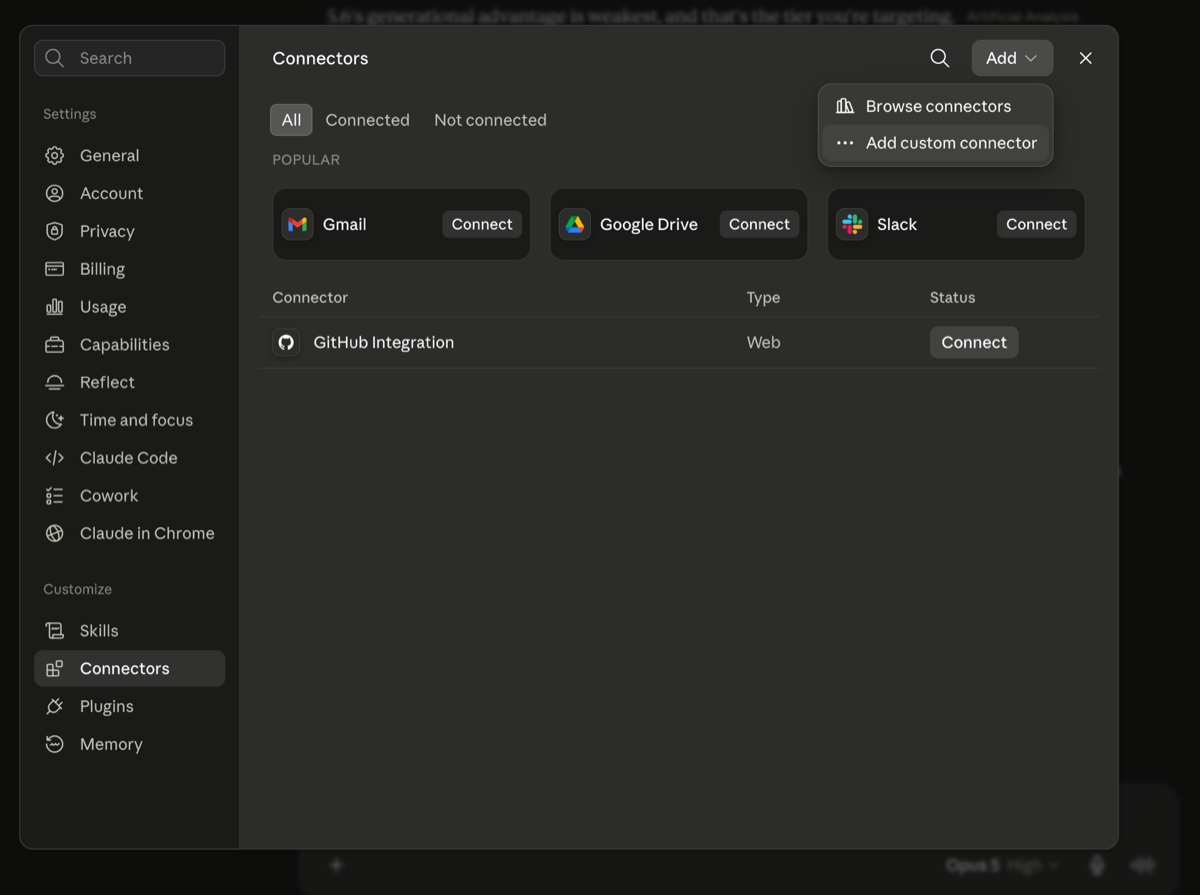
Settings → Connectors → Add → Add custom connector. -
Paste the address
Call it whatever you like — House Brownie does the job; it's only the label in your own list. Put the address into Remote MCP server URL, and leave the two OAuth boxes under Advanced settings empty. There is no secret to paste: Claude introduces itself to us automatically. Anything that asks you to paste a password here isn't us.
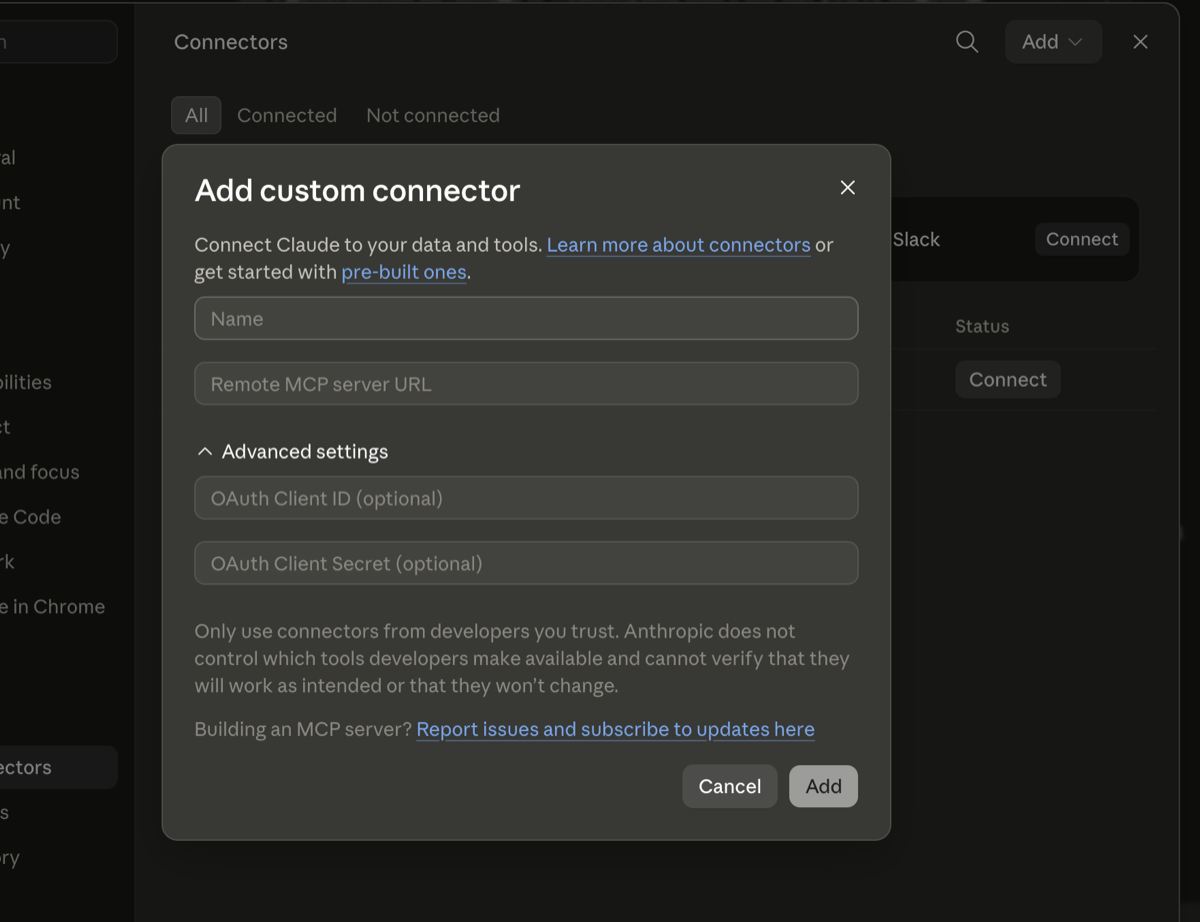
Name, then the address. The OAuth boxes stay empty. -
Say what it's allowed to do
Press Connect and Claude sends you here to sign in. Then you choose what it gets. Reading is ticked for you; the write permissions are never pre-ticked — letting Claude change things is always a deliberate tap, and you can grant reading only and change your mind later.
That's it. Ask Claude "what's low in the house?" and it'll tell you.
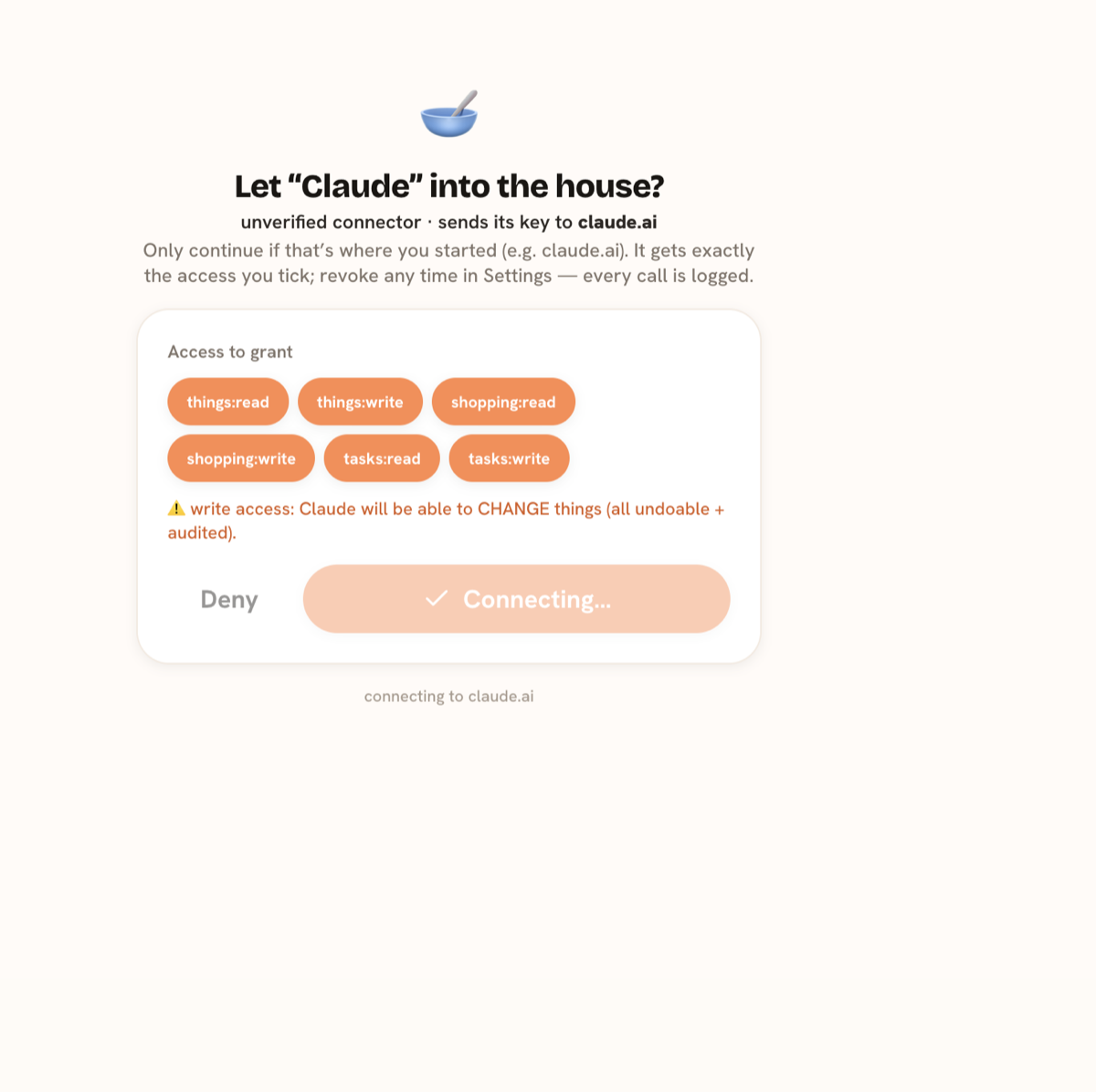
Our consent screen. Every call it makes is logged in your Settings, and you can revoke it there any time.
What about that token in Settings? You don't need one for this. The New token button exists for tools that can't do the sign-in dance above — Claude Code, Cursor, or your own scripts — which authenticate with a token instead. If you're connecting claude.ai, ignore it entirely.
Quiet on purpose
Some of the best features are refusals. No push notifications, ever; there's no setting because there's nothing to turn on. The house's needs wait on the Home screen.
No ads. Analytics are opt-in and off by default; until you flip the toggle, not one analytics request leaves your device. Your data is never sold or used to train AI. It's all on the privacy page, a three-minute read.
Nothing deletes by accident: archiving keeps history, and every batch offers Undo. Everyone works from the same data, which refreshes when you pick your phone back up; there's no live-sync engine, and I'd rather say so than imply magic. The exit is unlocked: the owner can export the whole household as one JSON file any time, no email to support, no fee.
The money part, honestly
The numbers first: $20 a year or $60 once, per household, up to eight people (ask and I'll raise it). The $20 buys twelve months and then stops: no subscription, no stored card, an email before it ends. Lapse and nothing is charged; your data goes read-only and keeps for a year. Lifetime carries a wind-down promise in the terms: at least six months' notice, export available the whole time. 14-day self-serve refund, once per household from your first purchase, minus the metered AI you used.
Voice is priced separately because it has real per-use costs: your own OpenAI key (free from us, cents a month to OpenAI) or credits at what the AI costs plus 15%, the only markup on the AI. The balance is a hard cap; at zero the mic pauses. Nobody gets a surprise bill.
Sold in the US and EU (not available in the UK yet). Prices in USD; any tax is added at checkout.
And here's the part I want to be plain about. I'm trying not to lose money on this. That's the whole pricing strategy.
I built House Brownie for my own home. Friends saw it and asked to use it, so I turned it into a service, and a service has bills: the database, the hosting, the AI calls, the payment processor. The prices cover a household's share of those bills with a little margin for my time. No investor, no growth target, no plan to squeeze anyone later.
So, plainly: if it doesn't fit how your house works, don't buy it. If you look at it and think "I could vibe code my own", you probably could. Go vibe code your own; it's a fun build. What you're buying here is that it already exists, has survived daily use by a real bilingual household, and someone else fixes it when it breaks.
Start your household in a couple of minutes — $20 a year or $60 once for the whole house, nothing auto-renews. Joining someone's house? Redeem your invite code.